HOWTO upload Your pictures to a radio model page
HOWTO upload Your pictures to a radio model page

1. Preparing Your digital radio pictures
To start with, You need some good quality pictures of the set.
On our site we appreciate to have several images for documentation of a set. One image from the front with a slight angle of 10 - 15° from (usually the right) side and 6 - 9° from above, so the image will get You an impression of the dephth of the cabinet and of controls on the side faces of the cabinet.
I usually include an image directly from the front (so You can identify the lettering of the controls, in case there is some lettering missing on Your set), one from the rear with the rear panel in place and one from the rear without the cover, so one can identify the innards, tube layout and speaker.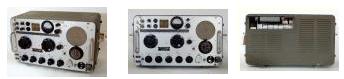
Try to use a white or neutral background and to avoid too many reflections on the dials. There are some texts about this that remain to be translated...
Your image should be in JPG format.
Here a link to how to optimize the quality of Your photos using the free software IrfanView.
Please adjust contrast / brightness / gamma correct inYour image Software for optimum and cut the image to shape, in IrfanView You can use the crop selection function for this.
Then You should change the size of Your image to a maximum width of 933 pixels (= optimum) and max. height of 1400 pixels (max. 180 KB).
You find all informations about maximum sizes, suitable file formats inthe different parts of our virtual museum under File upload at a glance.
You should rename Your file as follows (and remember the place, where it is stored on Your computer - that helps :-)
d (for Germany)_grundig (company)_satellit700 (model number or name)_front (or back, inside, and so on).jpg
2. Upload of the radio picture
Next, You go to the "Model page" of the set and use the button "Uploads and questions", You find this button at the top row of buttons on the model page. There You chose the button "Picture upload":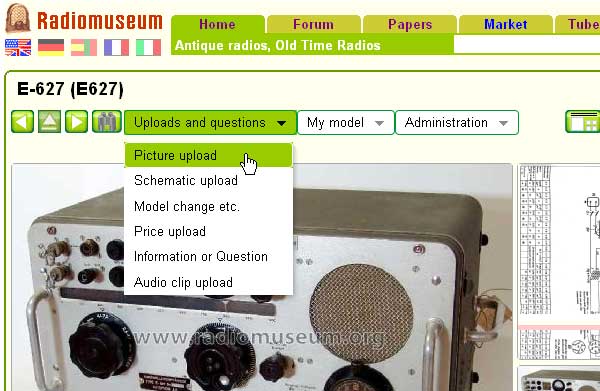
In the next window, You click on "Durchsuchen" (means "search / browse") and chose the path to the image file stored on Your computer.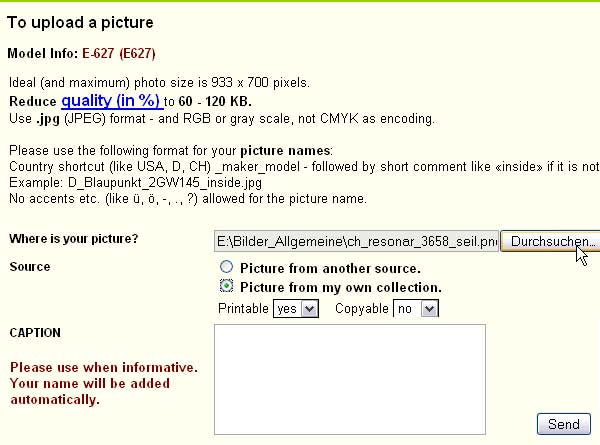
In case You upload an image of a set in Your own collection, that You want to see appear in Your "Collectors page", please mark "Picture form my own collection".
The other option "Picture from another source" is for scanned images from catalogues, images from sets in museums and so on - please make sure You have asked the owner for permission to use the photos.
These images won't be seen in Your collection page, that is automatically created on the RM.org server.
You can allow or ban copying and printing of Your images.
Click the "Send" button, after a minute You get a response from the rm-org - server telling You everything is ok.
Then proceed with the next picture.
Please take care, that You send the image from the right model page ;-)
As with Your "new radio model entry", please allow some hours or days, until a picture admin has accepted Your new pictures and You will see them on the model page.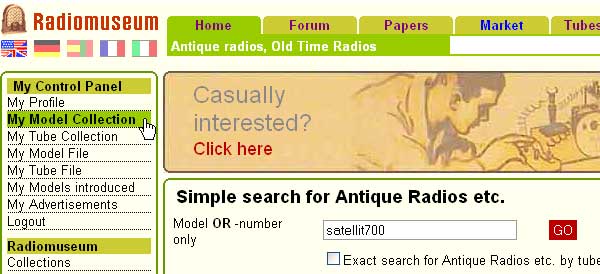
Click on "My Model Collection" when logged in and You find Your radio collection there.
Let me know, if You have problems with the procedure, it will become easy after the first few images, schematics or forum entries.
Hope that helps
Martin Boesch
EE November 14: edit because of new RM layout
To thank the Author because you find the post helpful or well done.
Pictures are important to find models by sets without name

Half a year ago I could write congratulations in this linked thread (post 27)
I quote some of my text here:
"My start page for the browser is
http://www.radiomuseum.org/dsp_newestimages.cfm
Therefore I often see new pictures - normally there are about 100 a day or more and I see only part of that - depending on how the pictures admin does the acceptance work.
Lately I often have seen pictures uploaded by Robin Roeckers (has by now uploaded 947 pictures, next is 238) and Meyer Rochwerger (Brazil, uploaded 472 pictures, mainly for the USA).
The difference to most other pictures is twofold:
They do not only upload pictures from their own collection (Code 1) but also get the permission from guests (courtesy remark in the picture legend) to upload pictures of given models which show none yet.
Well done indeed!
On top of that I saw today that both of them also use the link below in the model page:
"Add information or ask a question .." to add missing data for such a model.
This is real good work!"
In the meantime Robin has taken up a voluntary work here as our first American model administrator. This will help us to get better answers in case of questions about a changed or new model (no "snotty" answers). We should have more US volunteers on board! Who will help too please?
I now see that Robin Roeckers makes a further step: He has found or bought original old catalogs, like in this example of the U.S. Radio & Television Corp. model 31B the Catalog from Dutton Radio of Hastings, Nebraska, dated 1930-1931. In eBay one can often find such items.
This is one of the best examples how we should back up our models with dated primary sources.
It is the way to find interesting pictures, data - and the right date of market introduction - which is so essential for a reference work we try to build up.
To thank the Author because you find the post helpful or well done.
Fliers and catalogs - two types of pictures
I just sent an eMail to a member far away - to explain some uploads. I just include it here. Before: Please never picture the entire set frontal. Plese show the 3 dimensions - as you see in ads etc.:
You take an angle of about 15 degrees higher and from one side - and use if posible alsways 1400 pixels width ...
Here what I sent that member:
Dear .......
Thank you very much for being active in Radiomuseum.org.
You have created already 113 new models and made some changes.
Most of these models are for your country - but also for the USA etc.
That helps a lot for our goal of the most complete reference work for radios and related - and it helps each collector over the world. We deliver more than 200 000 pages a day to at least 20 000 different persons a day!
Now (2015) I can tell you that you can upload pictures up to 2100 pixels in height (and1400 width).
This is helpful for fliers and journals, catalogs as you loaded up on this model:
Also small writing can then be read when clicked to big size.
I would also suggest that before you reduce the size you take out a copy of the set itself, prepare it also to big size. Then you load up both pictures. The cut out set would be your first upload.
You can also load up entire pages with different models on it as is done here:
This shows users the date and place of advertisement and the whole family of offered sets. First again comes the individual set so that when looking at the picture gallery there is a full sized picture of the model. You see here - those 933 pixels are just not enough to read everything well.
You also see that 1938 models were offered - and sold - in the season 1937/38. That is why we don't date them to 1938 but to 1937/38. Journals and catalogs are some of the best sources to date a model right and to show the original cabinet for a given set (lesser confusions).
To thank the Author because you find the post helpful or well done.
Picture Uploads
In several places we are told that the maximum photo size is 933 pixels wide by 1400 pixels high. When I try to load one that is that size it is rejected. I have to scale the horizontal pixel count down to 850 before it is accepted. What is the problem?
To thank the Author because you find the post helpful or well done.
Save for WEB might be the solution, using JPG-Quality
Dear Allen
Did you use "Save for WEB" when you save it to your memory like HD? If not then you probably will not have access to the JPG-Quality setting and a certain size will give you too many KB.
It all depends also which program you use for working with the pictures. In the worst case they can not handle the JPG-quality - in other cases that part is a plug-in. The free Irfanview with the plug-in is the easiest solution because you have the illustrated step-by-step instruction in the link FAQ on the HP.
PS:
By default I have set JPG-Quality to 80%. If needed I then slide it down to much lesser quality, normally 60 % is good.
To thank the Author because you find the post helpful or well done.
Issue with loading pictures
Count of Thanks: 44
Hello, I have a strange error message when load pictures to the model page
Upload pictures
Parameter 2 of function Left which is now -1 must be a positive integer
position=11913
Model page: mediator 163x
I have 8 pictures from my radio, but only first uploaded successfully.
To thank the Author because you find the post helpful or well done.
Yes, a strange error!
Hi Viktor,
you uploaded one picture to model-ID = 12340. The file name was ".jpg". That is a strange error!
Please read before uploading what is written in the upload-window:
Please use the following format for your picture names:
maker_model - followed by short comment like «inside» if it is not the main view.
Example: rca_2XY145_inside.jpg
No accents etc. (like ü, ö, -, ., ?) allowed for the picture name.
Please give your files a correct name like ch_Mediator_M163AX_front.jpg.
A filename beginning with a dot is never allowed, as you know as PC-Expert.
Here you uploaded 2 pictures with not allowed file names: _7195817.jpg. That is not a strange error for the system, but not useful. I deleted the 2nd picture, because I have no idea what it shows. It looks like a wood plate before a red car. If it belongs to the model, crop it and write into the note, what is is.
For questions you may contact me by mail.
Heribert Jung
To thank the Author because you find the post helpful or well done.
Filename with only cyrillic letters is a problem
Hi Viktor,
regarding that you choose "RUS" as your country, I guess the filename(s) of your picture(s) contains only cyrillic letter. But the RM filesystem cannot handle cyrillic letters in filenames.
On upload procedure the system replace all not alphanumeric letters with the underline, and all unknown characters with nothing. So I believe the result of this if there are only cyrillic letters (who be interpreted as unknown characters) is an empty string, and this occurs the error.
Please try upload again with filename in latin letters.
To thank the Author because you find the post helpful or well done.